


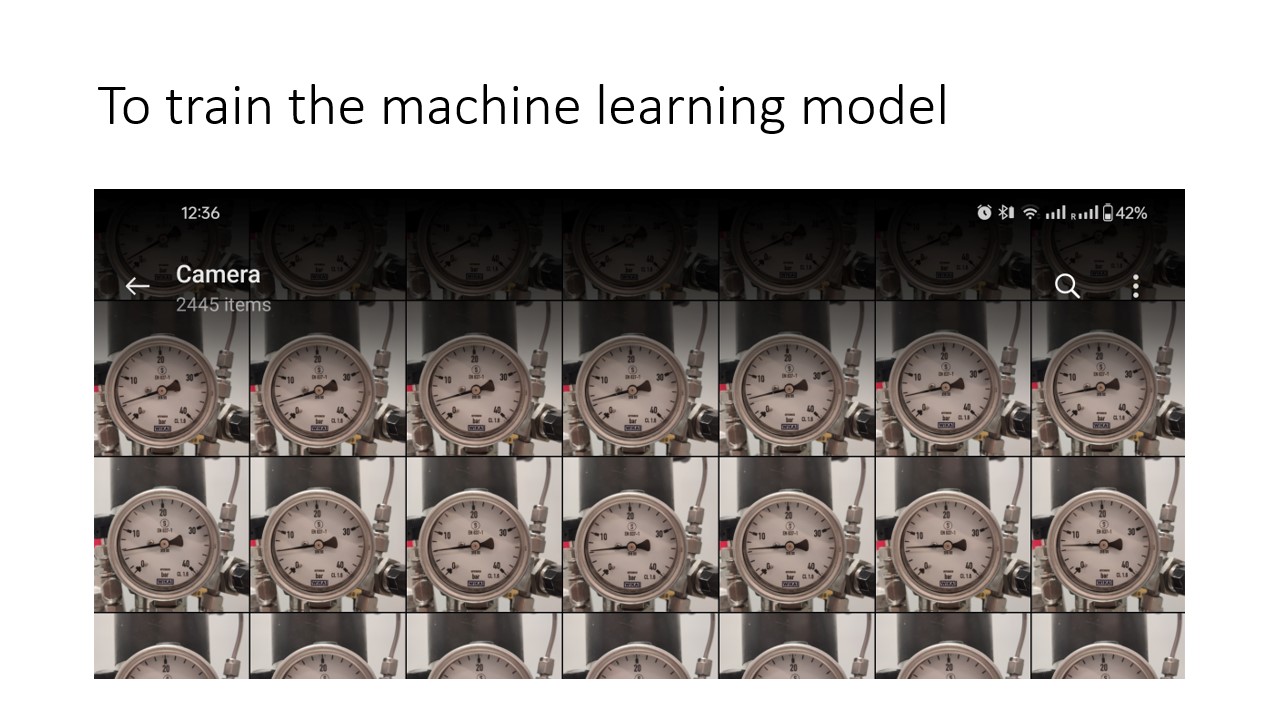
We take photos of the pressure sensor, at different readings and start labelling the images. this is the step we create data and make sure the data is informative and high quality. Next we set up the machine learning CNN model in Python
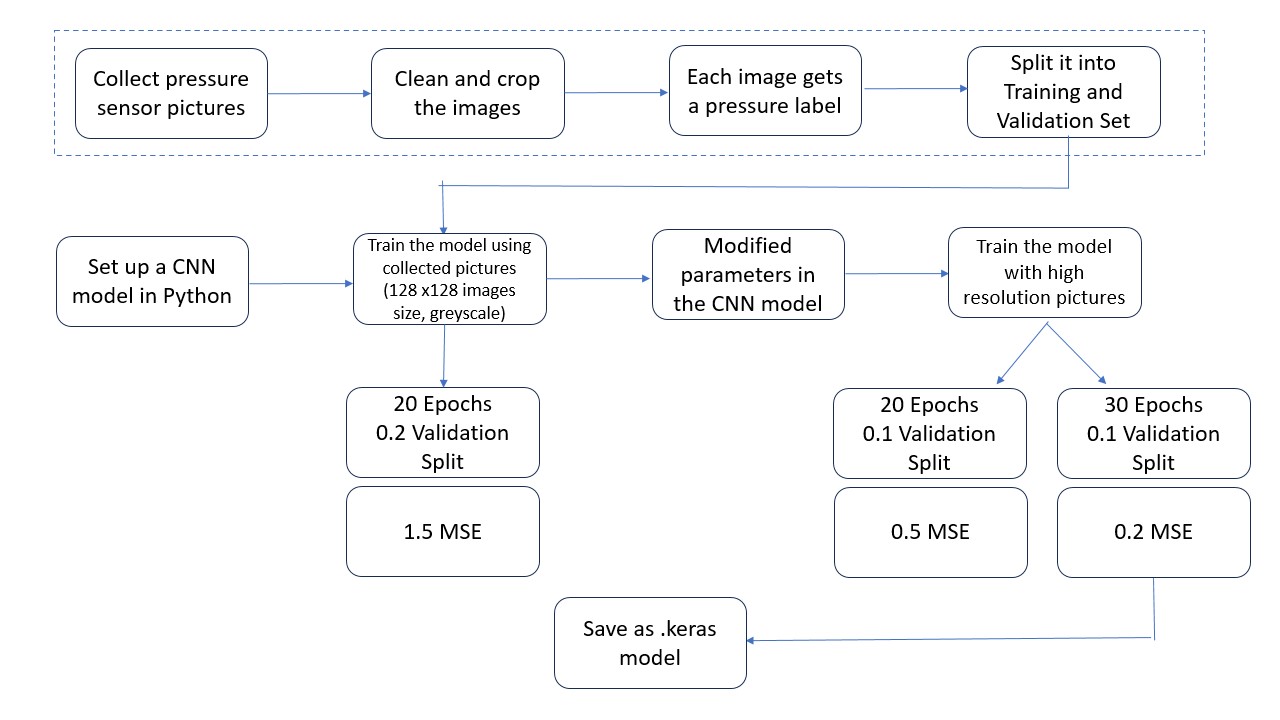
training the model to have optimal loss, a balancing game between validation split and epoch selection

Setup a modular architecture GUI, based on the Dungeons and Dragons style project from the Module ,Fundamentals of OOP in Python'
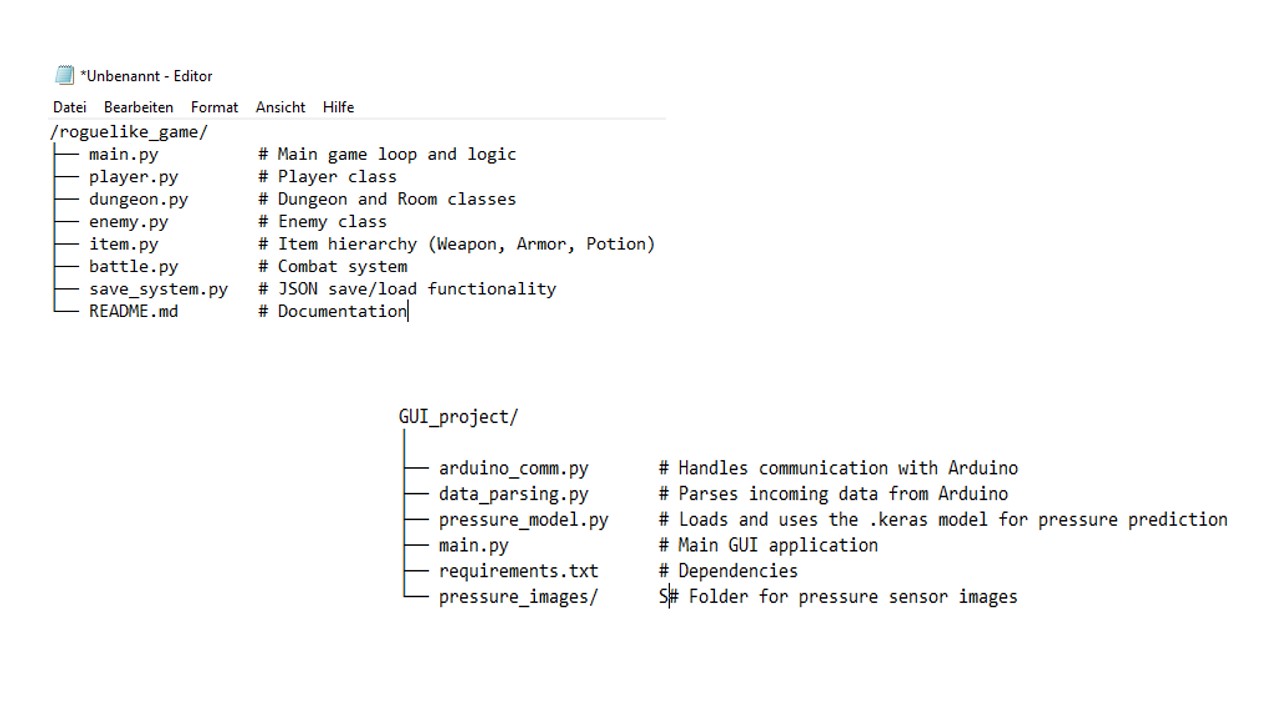
Design the GUI file embedding all the relevant information - .keras, arduino COMS, jupyter scripts inside main.py
Using PyQT, matplotlib, tensorflow and so on...the project is successfully completed
the main.py code is shared here, contact me to get the base .keras file, other GUI components
# main.py

import sys
import json
import os
import pandas as pd
from PyQt5.QtWidgets import (QApplication, QMainWindow, QWidget, QVBoxLayout, QHBoxLayout,
                             QLabel, QPushButton, QTextEdit, QFileDialog, QMessageBox)
from PyQt5.QtCore import QTimer, QDateTime

from arduino_comm import ArduinoManager
from data_parser import DataParser
from realtime_plot import MultiPanelPlot

class LabMonitorGUI(QMainWindow):
    def __init__(self):
        super().__init__()
        self.setWindowTitle("Smart Lab Monitoring System")
        self.setGeometry(100, 100, 1400, 900)

        # --- Data Buffer for Logging --- #
        self.data_buffer = pd.DataFrame(columns=[
            'timestamp', 'com_port',
            'temperature', 'voltage', 'co2',
            'frequency', 'amplitude', 'measurement_temperature'
        ])
        self.monitoring_active = False

        # --- Initialize Arduino Connections --- #
        self.arduino_com6 = ArduinoManager(port="COM6")
        self.arduino_com7 = ArduinoManager(port="COM7")

        # --- Initialize Data Parser --- #
        self.parser = DataParser()

        # --- Initialize Real-Time Plotting --- #
        self.plot = MultiPanelPlot(max_points=300)

        self.init_ui()
        self.load_config()
        self.setup_connections()

    def init_ui(self):
        main_widget = QWidget()
        main_layout = QHBoxLayout(main_widget)

        # --- Control Panel (Left Side) --- #
        control_panel = QWidget()
        control_layout = QVBoxLayout(control_panel)

        self.connect_btn = QPushButton("Connect Arduinos")
        self.connect_btn.setCheckable(True)

        self.start_stop_btn = QPushButton("Start Monitoring")
        self.stop_btn = QPushButton("Stop & Save Data")
        self.start_stop_btn.setCheckable(True)

        self.status_display = QTextEdit()
        self.status_display.setReadOnly(True)

        # Sensor summary labels
        self.label_com6 = QLabel("COM6 - Temp/Volt/CO2: --/--/--")
        self.label_com7 = QLabel("COM7 - Freq/Amp/Temp: --/--/--")
        # Removed pressure label from the GUI since it is handled separately
        # self.label_pressure = QLabel("Pressure: --bar")

        # Assemble control panel
        control_layout.addWidget(self.connect_btn)
        control_layout.addWidget(self.start_stop_btn)
        control_layout.addWidget(self.stop_btn)
        control_layout.addWidget(self.label_com6)
        control_layout.addWidget(self.label_com7)
        # Removed adding pressure label to the control panel:
        # control_layout.addWidget(self.label_pressure)
        control_layout.addWidget(QLabel("System Status:"))
        control_layout.addWidget(self.status_display)

        main_layout.addWidget(control_panel, 1)
        main_layout.addWidget(self.plot, 3)

        self.setCentralWidget(main_widget)
        self.apply_styles()

    def apply_styles(self):
        self.setStyleSheet("""
            QMainWindow { background-color: #2E3440; }
            QWidget { color: #D8DEE9; font-size: 14px; }
            QPushButton {
                background-color: #4C566A;
                border: 2px solid #5E81AC;
                padding: 8px;
                border-radius: 4px;
                min-width: 120px;
            }
            QPushButton:hover { background-color: #5E81AC; }
            QPushButton:checked { background-color: #BF616A; }
            QTextEdit {
                background-color: #3B4252;
                border: 1px solid #4C566A;
                padding: 5px;
            }
            QLabel { padding: 5px; }
        """)

    def setup_connections(self):
        # Button connections
        self.connect_btn.clicked.connect(self.toggle_connection)
        self.start_stop_btn.clicked.connect(self.toggle_monitoring)
        self.stop_btn.clicked.connect(self.stop_and_save_data)

        # Arduino signals
        self.arduino_com6.new_data.connect(self.process_data)
        self.arduino_com7.new_data.connect(self.process_data)
        self.arduino_com6.error_occurred.connect(self.show_error)
        self.arduino_com7.error_occurred.connect(self.show_error)
        self.arduino_com6.connection_update.connect(self.handle_connection)
        self.arduino_com7.connection_update.connect(self.handle_connection)

    def toggle_connection(self, checked):
        if checked:
            self.arduino_com6.connect_to_arduino()
            self.arduino_com7.connect_to_arduino()
            self.connect_btn.setText("Disconnect Arduinos")
        else:
            self.arduino_com6.disconnect()
            self.arduino_com7.disconnect()
            self.connect_btn.setText("Connect Arduinos")

    def handle_connection(self, port, connected):
        self.log_status(f"{port}: {'Connected' if connected else 'Disconnected'}")

    def toggle_monitoring(self, monitoring):
        if monitoring:
            if not self.validate_start_conditions():
                self.start_stop_btn.setChecked(False)
                return
            self.monitoring_active = True
            self.log_status("Monitoring started")
        else:
            self.monitoring_active = False
            self.log_status("Monitoring stopped")

    def validate_start_conditions(self):
        # Check Arduino connections
        if not (self.arduino_com6.ser and self.arduino_com6.ser.is_open):
            self.show_error("COM6 Arduino not connected")
            return False
        if not (self.arduino_com7.ser and self.arduino_com7.ser.is_open):
            self.show_error("COM7 Arduino not connected")
            return False
        return True

    def process_data(self, port, raw_data):
        try:
            parsed = self.parser.parse_arduino_data(port, raw_data)

            if port.upper() == "COM6":
                parsed.setdefault("temperature", 0)
                parsed.setdefault("voltage", 0)
                parsed.setdefault("co2", 0)
                self.plot.update_com6(parsed)
                self.label_com6.setText(
                    f"COM6 - Temp: {parsed['temperature']:.2f}°C, Volt: {parsed['voltage']:.2f}V, CO2: {parsed['co2']:.0f}"
                )
            elif port.upper() == "COM7":
                parsed.setdefault("frequency", 0)
                parsed.setdefault("amplitude", 0)
                parsed.setdefault("temperature", 0)
                self.plot.update_com7(parsed)
                self.label_com7.setText(
                    f"COM7 - Freq: {parsed['frequency']:.2f}Hz, Amp: {parsed['amplitude']:.2f}, Temp: {parsed['temperature']:.2f}°C"
                )

            # Removed pressure label update since pressure sensor info is now handled separately
            # self.label_pressure.setText(f"Pressure: {parsed.get('pressure', 0):.2f}bar")

            # Append data to buffer (pressure info removed)
            new_row = {
                'timestamp': QDateTime.currentDateTime().toString("hh:mm:ss"),
                'com_port': port,
                'temperature': parsed.get("temperature", 0),
                'voltage': parsed.get("voltage", 0),
                'co2': parsed.get("co2", 0),
                'frequency': parsed.get("frequency", 0),
                'amplitude': parsed.get("amplitude", 0),
                'measurement_temperature': parsed.get("temperature", 0)
            }
            self.data_buffer = self.data_buffer.append(new_row, ignore_index=True)
        except Exception as e:
            self.show_error(f"Data processing error: {e}")

    def stop_and_save_data(self):
        """Stops monitoring and saves data to CSV"""
        if self.monitoring_active:
            self.monitoring_active = False
            self.start_stop_btn.setChecked(False)
            self.log_status("Monitoring stopped")

        if self.data_buffer.empty:
            self.show_error("No data to save!")
            return

        path, _ = QFileDialog.getSaveFileName(self, "Save Data", "", "CSV Files (*.csv)")
        if path:
            try:
                self.data_buffer.to_csv(path, index=False)
                self.log_status(f"Data saved to {path}")
                self.data_buffer = self.data_buffer.iloc[0:0]  # Clear buffer
            except Exception as e:
                self.show_error(f"Save error: {str(e)}")
        else:
            self.log_status("Save cancelled")

    def log_status(self, message):
        timestamp = QDateTime.currentDateTime().toString("hh:mm:ss")
        self.status_display.append(f"[{timestamp}] {message}")

    def show_error(self, message):
        QMessageBox.critical(self, "Error", message)
        self.log_status(f"ERROR: {message}")

    def save_config(self):
        config = {}
        with open('config.json', 'w') as f:
            json.dump(config, f)

    def load_config(self):
        try:
            with open('config.json', 'r') as f:
                config = json.load(f)
        except FileNotFoundError:
            pass

    def closeEvent(self, event):
        self.arduino_com6.disconnect()
        self.arduino_com7.disconnect()
        if self.monitoring_active:
            self.stop_and_save_data()
        self.save_config()
        event.accept()

if __name__ == "__main__":
    app = QApplication(sys.argv)
    window = LabMonitorGUI()
    window.show()
    sys.exit(app.exec_())