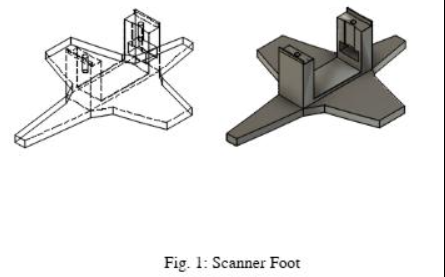
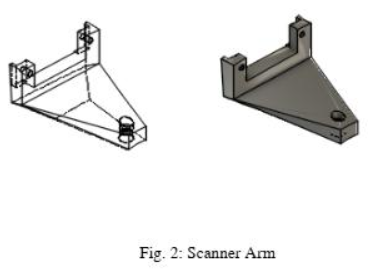
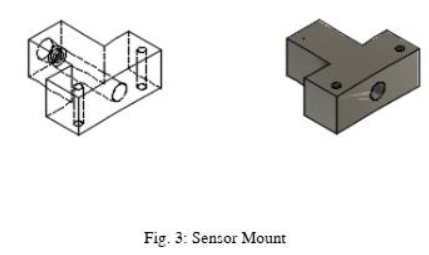
Arduino IDE code:
#include <ESP8266WiFi.h>
#include <WiFiClient.h>
#include <ESP8266WebServer.h>
#include <FS.h>

#include "Adafruit_VL53L0X.h"
Adafruit_VL53L0X tof = Adafruit_VL53L0X();


const char *renderer =
#include "Renderer.h"

#include <Servo.h>

ESP8266WebServer server(80);

//servo instances
Servo yawServo;
Servo pitchServo;

/************** configuration *************/
const int pinTrigger = 12; //D6
const int pinEcho = 13; //D7
const int pinServoYaw = 16; //D0
const int pinServoPitch = 14; //D5

const bool useTimeOfFlight = true;  //false: ultrasonic, true: tof

//angle step per measurement. 1 best resolution (slowest), >1 lower res
const int stepYaw = 1;
const int stepPitch = 1;
//readings to avarage per position (more readings give softer results but take longer)
const int avgCount = 1;

// limit scan range
const int yawRange[] = {0, 80};
const int pitchRange[] = {0, 90};

// limit scan distance
const float validRange[] = {0.05, 0.30};
const float offset = 0.012;

// add offset to position calculation
const float yawOffset = -45;
const float pitchOffset = -45;

// delays for scans
static const int fixedDelay = 20;
static const int delayPerStep = 10;


//read ultrasonic distance
float readDistanceUltrasound()
{
  digitalWrite(pinTrigger, LOW);
  delayMicroseconds(2);
  digitalWrite(pinTrigger, HIGH);
  delayMicroseconds(10);
  digitalWrite(pinTrigger, LOW);
  return pulseIn(pinEcho, HIGH, 26000) * 0.000345f * 0.5f;
}

//read fime of flight distance
float readDistanceTimeOfFlight()
{
  VL53L0X_RangingMeasurementData_t measure;
  tof.rangingTest(&measure, false);

  if (measure.RangeStatus != 4)
    return measure.RangeMilliMeter * 0.001f;
  else
    return 0;
}

//perform a scan and write points to vertices.js as an array that can be used by js and webgl
void scan()
{
  yawServo.attach(pinServoYaw);
  pitchServo.attach(pinServoPitch);
  //this centers the servos according the range
  yawServo.write((yawRange[0] + yawRange[1]) / 2);
  pitchServo.write((pitchRange[0] + pitchRange[1]) / 2);
  delay(3000);

  //opening a file for write.. overwriting if exists
  File f = SPIFFS.open("/distance.js", "w");
  if (!f)
  {
    Serial.println("file open failed");
    return;
  }
  //writing a JS array directly into the file, this get's included in the HTML
  f.print("var vertices = new Float32Array([");
  //scanning the range
  for(int yaw = yawRange[0]; yaw < yawRange[1]; yaw += stepYaw)
  {
    //returning to the starting position of the pitch column
    yawServo.write(yaw);
    pitchServo.write(pitchRange[0]);
    delay(1000);

    //proceeding the pitch
    for(int pitch = pitchRange[0]; pitch < pitchRange[1]; pitch += stepPitch)
    {
      pitchServo.write(pitch);
      float d;

      //this part could be simplified.. ended up being similar for both sensor types
      if(useTimeOfFlight)
      {
        //a delay to have time to reach the position
        delay(fixedDelay + delayPerStep  * stepPitch);
        //averaging several readings
        float avg = 0;
        int svgc = 0;
        for(int i = 0; i < avgCount; i++)
        {
          delay(40);
          float d = readDistanceTimeOfFlight();
          //only consider redings within the range
          if(d >= validRange[0] && d <= validRange[1])
          {
            avg +=d;
            svgc++;
          }
        }
        //calculate the averege
        d = avg / max(1, svgc);
      }
      else
      {
        //similar as above
        delay(fixedDelay + delayPerStep * stepPitch);
        float avg = 0;
        int svgc = 0;
        for(int i = 0; i < avgCount; i++)
        {
          delay(10);
          float d = readDistanceUltrasound();
          if(d >= validRange[0] && d <= validRange[1])
          {
            avg +=d;
            svgc++;
          }
        }
        d = avg / max(1, svgc);
      }
      //if reading was not out of range, calculate the position and write to the JS array in the file... (and on the serial output)
      if(d > 0)
      {
        float yawf = (yaw + yawOffset) * M_PI / 180;
        float pitchf = (pitch + pitchOffset) * M_PI / 180;
        float od = offset + d;
        float x = -sin(yawf) * od * cos(pitchf);
        float y = cos(yawf) * od * cos(pitchf);
        float z = od * sin(pitchf);
        String vertex = String(x, 3) + ", " + String(y, 3) + ", " + String(z, 3);
        Serial.println(vertex);
        f.print(vertex + ", ");
      }
      else
        Serial.println("far");
    }
  }
  //closing arrays and files
  f.print("]);");
  f.close();
  yawServo.detach();
  pitchServo.detach();
}

//serve main page
void returnRenderer()
{
  server.send (200, "text/html", renderer);
}

//serve stored vertices
void returnVertices()
{
  File file = SPIFFS.open("/distance.js", "r");
  server.streamFile(file, "script/js");
  file.close();
}

//setup. executed first
void setup()
{
   SPIFFS.begin();

  // Initialize Serial
  Serial.begin(115200);
  delay(3000);

  // Initialize Sensors
  if(useTimeOfFlight)
  {
    tof.begin();
  }
  else
  {
    pinMode(pinTrigger, OUTPUT);
  }

  // Turn off WiFi initially
  WiFi.mode(WIFI_OFF);
  delay(1000);  // Give some time for the WiFi module to reset

  // Perform a scan
  scan();

  // Start WiFi Access Point
  WiFi.mode(WIFI_AP);  // Ensure it's set to Access Point mode
  delay(500);  // Wait for WiFi to initialize
  if (WiFi.softAP("Scanner")) {
    Serial.println("WiFi Access Point Ready");
  } else {
    Serial.println("Failed to start AP");
  }

  Serial.print("Soft-AP IP address = ");
  Serial.println(WiFi.softAPIP());

  // Start Web Server
  server.on("/", returnRenderer);
  server.on("/vertices.js", returnVertices);
  server.begin();
}

void loop()
{
  //handle the server
  server.handleClient();
}
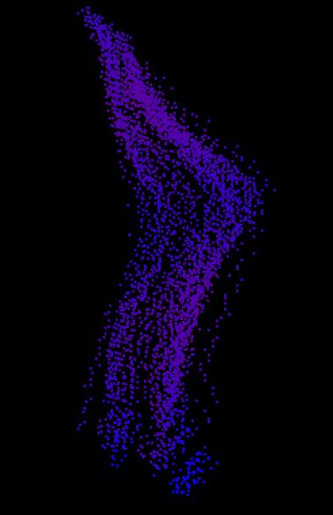
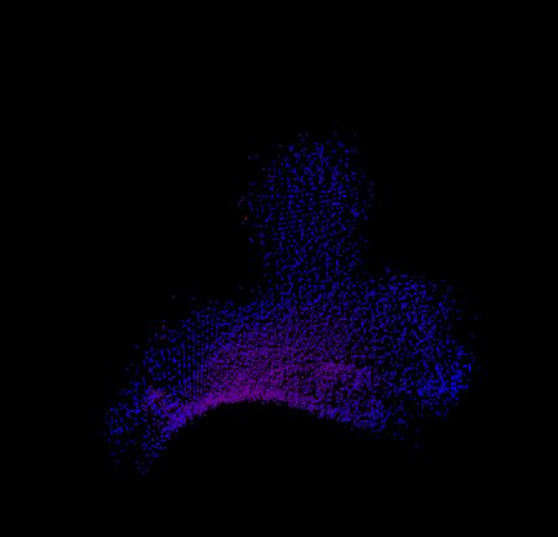
The project showcased was first intended to use ultrasound technology rather than LiDAR, but due to technical complications, LiDAR was chosen. The code above allows the use of either technology. This project utilized a VL530X ToF sensor for distance readings, paired with two servos (yaw and pitch), and an ESP8266 microcontroller. The microcontroller was programmed to take readings every 1 degree, controlled by the yaw servo. After the yaw servo completed 180 degrees, the pitch would move 1 degree down. The depth and location of all these points were saved to a file, which was accessed by an open-source renderer using WebGL. This allowed me to create a point cloud of a 3D object in digital space, which was then using the ESP8266's wifi capabilities communicated to a device.
A few scans I was able to achieve:
CAD Files: